Description
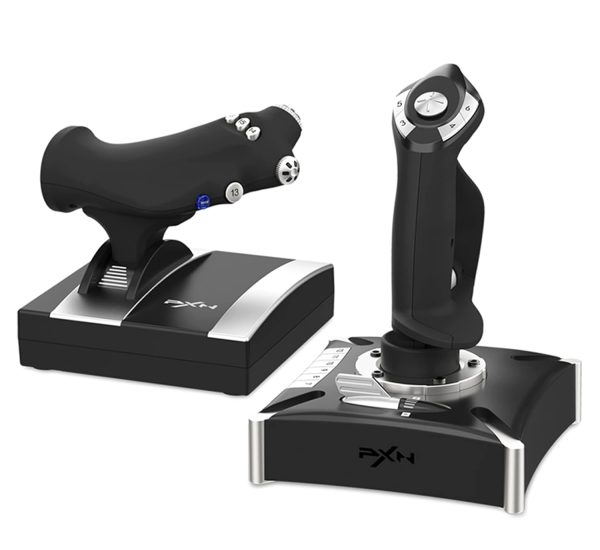
PXN-2119 Pro Flight Simulator Joystick with Throttle & Vibration Feedback
PXN-2119 Pro flight joystick with throttle control, dual vibration motors, and wide PC & PS4 game compatibility for immersive flight simulation.
Realistic Flight Simulation Experience
The PXN-2119 Pro Flight Joystick is designed for serious flight simulation enthusiasts. Featuring a separate joystick and throttle unit, it accurately simulates aircraft throttle, rudder, and engine control. Built-in damping feedback adds resistance for precise throttle reasoning, delivering a more authentic flying experience.
Dual Vibration Feedback System
Equipped with dual vibration motors, the PXN-2119 Pro simulates airflow and in-game vibrations. This enhances realism during takeoff, turbulence, combat maneuvers, and landing, offering deeper immersion in flight simulation games.
PC & PS4 Compatibility
Supported Platforms & Games
PC (Windows XP / 7 / 8 / 10):
-
Microsoft Flight Simulator 2020
-
War Thunder
-
Tom Clancy’s H.A.W.X. 2
-
World of Warplanes
-
X-Plane
-
Air Combat and more
PS4:
-
Ace Combat: Unknown Territories
Not Supported:
-
macOS / Apple devices
-
PS3 / PS5
Easy PC Connection Setup
-
Visit the official PXN website (E-PXN)
-
Navigate to Home → Support → Tools and download the PXN joystick driver
-
Extract and install the driver following on-screen instructions
-
Plug the PXN-2119 Pro into a PC USB port
-
Configure button mapping and sensitivity in PXN Joystick software
PS4 Connection Method
-
Connect the throttle unit to the joystick
-
Plug the original PS4 controller (powered OFF) into the joystick guide port
-
Connect the joystick to the PS4 console via USB
-
Press Button 12 or Button 13 on the joystick to launch and play supported games
Important Usage Notes
-
If the PC does not recognize the joystick, install the PXN-2119 Pro driver
-
If buttons do not respond, enable Joystick Mode in the game’s control settings
-
For Microsoft Flight Simulator 2020 and X-Plane 11, detailed button mapping guides are available on the E-PXN official website under Service → Joystick Game Button Settings
Model & Price
Model: PXN-2119 Pro
Price: XN-2119 Pro Flight Simulator Joystick Is Priced At NPR 14,499 in Nepal at gaminghousenepal.com




Reviews
There are no reviews yet.